


Manta - Manga, Manhwa, Novels
3.83.91K Reviews
App Specs
- Version
- 26.6.464
- Updated On
- License
- Free
- Downloads
- 5,000,000+
- Developer
- RIDI Corporation
- Categories
- Comics
- Platform
- Android, iOS
Screenshots


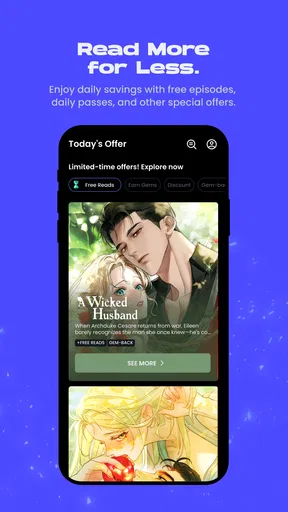

 Analysis by AppCompare
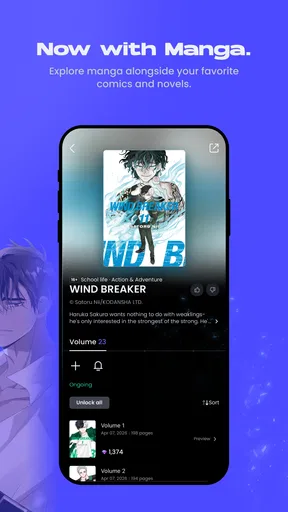
I approach Manta - Manhwa, Comics, Novels as a reading app first: a place to browse illustrated stories and settle into an episode when I have a few spare minutes. That makes it especially appealing if you want comics on your phone without having to hunt through unrelated formats. I also like that it brings manhwa, comics, and webnovels into one reading destination, though the experience is still shaped by the titles and access options available inside the app.
A comfortable routine for finding a story
My most reliable way to use Manta is to decide what kind of reading mood I am in before I start browsing. If I want something quick, I look for a series whose premise catches my attention and try a few chapters. If I have more time, I’m more willing to explore a longer story or switch between illustrated episodes and prose. That small habit keeps browsing from turning into an endless scroll, and helps me remember which titles I actually want to continue.
The first few minutes are useful for learning how the catalogue is organized and how a series page presents its chapters. I recommend checking the title details before settling in, especially if you are choosing between several stories. A striking cover can make a series tempting, but a synopsis and a short sample are better clues to whether its tone and pacing suit you. For a new reader, sampling more than one genre is an easy way to find out whether Manta’s selection matches your tastes.
Settings and reading habits worth checking
Before making Manta part of a commute or bedtime routine, I would explore the reading controls and settings available on your device. Small preferences can make a noticeable difference when you read several episodes at a time: find a comfortable screen brightness, use the display orientation that feels natural, and check how the app handles chapter navigation. I avoid assuming that one setup works for every series; artwork and panel flow can feel different from one title to another.
Offline reading can be useful when you expect a patchy connection, but it works best as a little bit of preparation rather than a last-second fix. I would open the app and make sure the chapters I plan to read are available before leaving home. That is a practical habit for a train ride or a waiting room, and it also avoids relying on a network at the exact moment I want to continue a story. Download availability and the way chapters are managed can depend on the app’s current options, so it is worth checking those controls directly.
Because a comics app can become a regular part of a daily routine, I also recommend checking notification and account preferences instead of leaving every default untouched. Keep only the alerts that help you return to a series you care about, and review any reading or access settings before starting a long session. This is less about digging for hidden tools and more about making the app fit your habits rather than letting it interrupt them.
Discovering the World of Manta
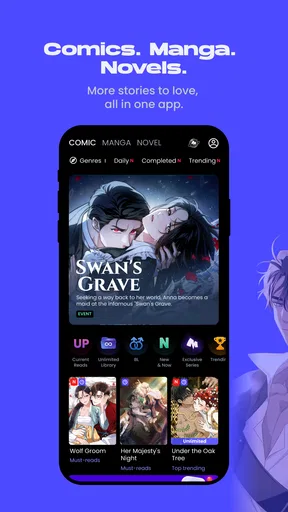
When I first stumbled upon Manta, I was immediately drawn to its sleek interface. It's like stepping into a vibrant library where every corner holds a new story waiting to unfold. The app boasts an impressive collection of manhwa and comics, each more captivating than the last. What I really appreciate is how user-friendly it is. You don’t need to be a tech wizard to navigate through its features.
Worth Reading Before You Choose

Flipboard Shows What News Apps Must Do Beyond the Feed

Switching to Android Auto Means Rethinking Your Driving Routine

Google Calendar Makes a Crowded Week Easier to Manage

Ludo King Makes the Most of the Minutes Between Plans

Baby Panda World Brings Quick Play to Modern Phones, but Its Game Library Feels Busy

ESPN’s Live Game View Makes Following Close Games Easier
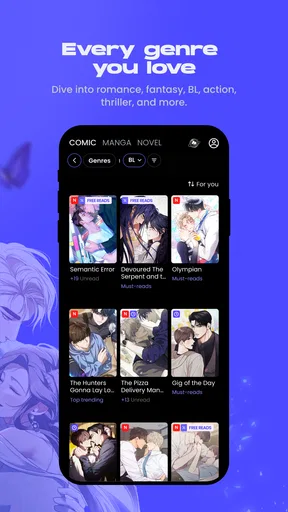
One of the coolest things about Manta is its wide range of genres. Whether you’re into heart-pounding action, sweet romance, or spine-tingling horror, there's something here for everyone. I found myself spending hours exploring different titles, each offering a unique narrative and stunning visuals.
Features That Make Manta Stand Out
Now, let’s talk about what sets Manta apart from other similar apps. First off, the absence of ads is a breath of fresh air. You can immerse yourself in your favorite stories without those pesky interruptions. Another thing I love is the offline reading feature. It's perfect for those moments when you’re on the go and need a quick escape into a fantastical world.
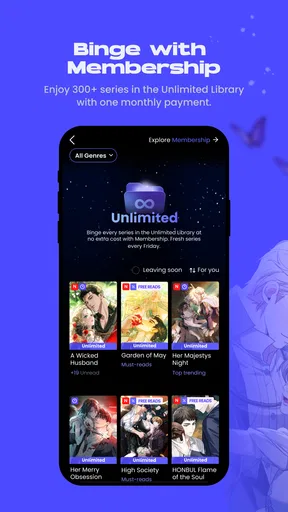
The app’s subscription model is also worth mentioning. It provides unlimited access to all content at a reasonable price, which is a fantastic deal for avid readers like me who can’t get enough of their favorite series. Plus, the app is constantly updating with new content, so there's always something fresh to look forward to.
Picking the right reading pattern
A useful way to get more from Manta is to separate discovery from reading. I browse when I have time to compare stories, then return to a chosen series when I want to focus. If I’m reading several titles at once, I keep the list short enough that I can remember each story’s characters and conflicts. That sounds simple, but it makes episodic reading more satisfying than opening the app and trying to reconstruct where I left off across a dozen unrelated plots.
For a realistic everyday example, I might use a short break to read one episode, then save a longer session for later when I can pay attention to the art and dialogue without rushing. Before a commute, I check that the chapters I want are ready for offline access; at home, I browse for something new instead. This split routine helps me avoid spending limited mobile time searching, while still leaving room for discovery when I am not in a hurry.
Compared with a general comics reader, Manta is a more focused choice for people who want a dedicated catalogue of serialized stories rather than a tool for managing a personal collection of files. Compared with reading through a mobile browser, it gives me a purpose-built place to browse and continue series. The trade-off is that the experience depends on what is available in Manta and how each title is offered; readers who want to bring together comics from many sources may prefer a broader library or a publisher-specific service that carries the works they already follow.
Access, spending, and practical limits
Manta is free to install, but that does not mean every reading choice is necessarily free. The app includes in-app purchases, and the available access model matters if you read only occasionally or tend to finish series quickly. I would check the current options inside the app before committing to a paid plan or making a purchase, then compare that cost with how often I realistically read. A subscription can make sense for someone who reads regularly across the catalogue; a lighter reader should first understand what is included and what requires payment.
The app is rated Teen, so I would not treat that label as a promise that every story will suit every younger reader. It is sensible to look at an individual title’s content and tone, especially when sharing a device or recommending a series to someone else. That is a more dependable approach than assuming all comics in one app have the same themes.
There are limits to the format, too. Phone reading is convenient, but a small screen can make detailed artwork less enjoyable, and long sessions may be less comfortable than reading on a larger display. Offline access helps with connectivity, yet it still takes planning. And while a broad range of genres is welcome, readers searching for a particular series should check the catalogue rather than assume it is there. These are not deal-breakers for me, but they are reasons to think about how and what you read before making Manta your main comics app.
My Personal Experience
I have to say, diving into the stories on Manta has been an absolute delight. The illustrations are vibrant and the storytelling is top-notch. I found myself particularly drawn to a series called "Under the Oak Tree" – the artwork is simply breathtaking, and the plot twists kept me on the edge of my seat.
One tiny hiccup I encountered was the occasional glitch when loading new chapters, but hey, no app is perfect, right? Overall, the seamless experience makes this a minor issue in the grand scheme of things.
For smoother sessions, I treat a loading delay as a cue to check my connection and give the chapter a moment before tapping repeatedly. Repeated taps can make it harder to tell whether the app is still responding or whether I need to try again. If the issue becomes persistent, restarting the app and checking for an available update are sensible first steps. The current release is version 25.12.439, and the app is listed for Android 7.0 and later, so compatibility is worth checking before installing it on an older device.
RIDI Corporation is the developer behind Manta. The app has an average rating of 3.6 from around 61,000 ratings, with roughly 3,800 written reviews and more than five million installs. I take those figures as useful context rather than a verdict: individual experiences can differ depending on reading preferences, device performance, and expectations about paid access. The most helpful test is still whether its available stories and reading approach suit you.
Who will enjoy it, and who may prefer something else
I would recommend Manta to readers who enjoy following serialized manhwa and comics on a phone, like sampling different genres, and value having a dedicated place to return to stories. It can also suit someone who wants an occasional webnovel alongside illustrated reading, rather than installing separate apps for every format. The app is particularly practical for people who can build a small routine around it: browse when they have leisure, prepare for offline reading before going out, and use short breaks to catch up.
I would hesitate to make it my first recommendation for someone who wants a general-purpose reader for comics they already own, needs a specific title that is not in its catalogue, or prefers to read mostly on a large screen. It may also be a poor fit if you dislike subscription or in-app purchase models and expect every story to be included at no cost. In those cases, compare access terms first or look for a service built around your preferred publishers and reading format.
Is Manta Worth It?
If you’re a fan of comics and novels, Manta is definitely worth checking out. It’s like having a portable library in your pocket, ready to whisk you away to different worlds whenever you need a break from reality. With its diverse collection and ad-free experience, it’s hard not to get hooked.
So go ahead, download Manta and immerse yourself in the stories that await. Trust me, you won’t be disappointed!
A measured recommendation
My advice is to start by browsing a few titles you genuinely want to read, then see how the access options fit your budget and habits. If the selection clicks, a repeatable routine—choose a series, prepare chapters before going offline, and keep notifications and display preferences comfortable—makes the app easier to enjoy without turning reading into another chore. If you mainly want a flexible shelf for comics from many sources, or only read now and then, a different reader may serve you better.
Manta is free to download and has a Teen content rating. Its appeal is less about being the right answer for every comic reader and more about offering a focused home for people drawn to its serialized stories. I find it most convincing when I treat it as a place to discover and follow a few chosen series, while staying attentive to chapter access, screen comfort, and the cost of reading regularly.
Pros
- Wide variety of genres available.
- High-quality
- engaging artwork.
- User-friendly interface design.
- Regularly updated with new content.
- Offline reading mode available.
Cons
- Limited free content availability.
- No option for page scrolling.
- In-app ads can be intrusive.
- Requires a subscription for premium.
- Occasional app performance lags.
FAQs for Manta - Manga, Manhwa, Novels
What is Manta and what types of content does it offer?
Manta is a digital platform offering a vast collection of manhwa, comics, and novels. It provides users with a wide variety of genres, including romance, fantasy, and action. Manta is particularly known for its high-quality, original content specifically tailored for comic and novel enthusiasts, making it a go-to app for story lovers.
Is Manta a free app, or does it require a subscription?
Manta operates on a subscription model, offering unlimited access to its entire library for a monthly fee. This model eliminates the need for in-app purchases or ads, providing a seamless reading experience. New users can often take advantage of free trials to explore the app's offerings before committing to a subscription.
What devices are compatible with Manta?
Manta is compatible with both Android and iOS devices, making it accessible to a wide range of users. The app is optimized for smartphones and tablets, ensuring a smooth and user-friendly interface. Regular updates help maintain compatibility with the latest operating systems, enhancing the overall user experience.
Can I access Manta content offline?
Yes, Manta allows users to download comics and novels for offline reading. This feature is particularly beneficial for users who want to enjoy their favorite stories without an internet connection. Download limits may apply based on the subscription plan, so it's advisable to check the app's terms for specific details.
How often is new content added to Manta?
Manta frequently updates its library with new comics and novels, keeping content fresh and engaging for users. New chapters and titles are typically added weekly, ensuring a constant stream of new material. This regular update schedule helps maintain user interest and encourages continued engagement with the app.


